Work Project
A Hohmann transfer calculator that shows its working
A browser calculator for Hohmann transfers that plots the transfer and shows every intermediate step, tested with three undergraduate and three graduate aerospace students.
Students usually meet Hohmann transfers as formulas and static diagrams. We built a calculator that lets a student pick which quantities to give and which to find, plots the transfer, and steps through the intermediate calculations, then watched six aerospace students use it.
Why it matters for GNC. The same vis-viva relations drive the plotter on this site, re-implemented and checked against Vallado's worked example and an independent numerical propagation.
The problem
Orbital mechanics is taught largely through textbook equations and decades-old charts, with little to see. A Hohmann transfer, the cheapest two-burn move between coplanar circular orbits, is one of the first maneuvers students learn and a good test case for an interactive tool.
The tool
The calculator runs in the browser in HTML and JavaScript. A student chooses the inputs and outputs, so the same page answers different homework questions: initial and final orbit altitudes, spacecraft mass with and without propellant, specific impulse or exhaust velocity, and the central body. It returns the burns and the propellant needed, plots the transfer, and lays out each intermediate step.
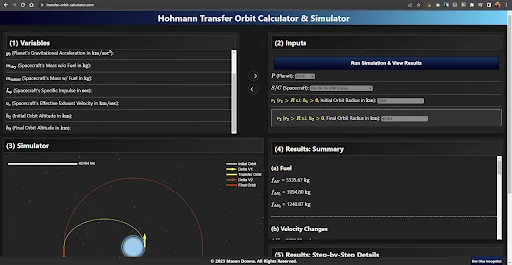
The calculator’s home screen: variables, inputs, the plot, and the results with step-by-step details. The original screenshot is low resolution.
The mechanics
For circular orbits of radius and around a body with gravitational parameter , the transfer ellipse touches both, so its semi-major axis is their average, and the vis-viva equation gives the speed anywhere on it:
Each burn is the difference between the circular speed and the transfer speed at that radius:
The coast takes half the transfer orbit’s period, and the rocket equation turns the total into propellant for an engine of specific impulse :
Try it
I rebuilt the core of the calculator for this site. Ticks along the transfer mark equal intervals of time, so they crowd together near apoapsis, where the spacecraft is slowest.
- Δv₁
- 2.397 km/s
- Δv₂
- 1.456 km/s
- Total
- 3.854 km/s
- Time of flight
- 5.29 h
- Transfer a
- 24,471 km
- Transfer e
- 0.7230
The study
We ran a formative usability study with three undergraduate and three graduate aerospace students. An “Experiment Mode” in the page logged time on task and clicks; afterwards each participant completed the NASA-TLX workload survey and the System Usability Scale.
Click heat maps showed the graduate students spending more of their time in the step-by-step panel than the undergraduates. Participants’ feedback pointed most often to clearer labels on the plot.
Six participants can surface usability problems but cannot show a learning effect, and the study had no pre- and post-test to measure one. The heat-map difference between groups is an observation worth following up, not a finding. There was no user research before the build.
The heat maps were embedded from externally hosted slides and did not survive the export.